Security teams are responsible for keeping users connected, applications available, and networks protected across increasingly distributed environments. But understanding activity associated with users, devices, applications, branches, and security services often requires piecing together information from multiple places.
The challenge isn’t a lack of data. It’s turning that data into a clear understanding of what is happening, what needs attention, and what to do next.
Command Center 2.0 in Strata Cloud Manager brings that context together, giving security leaders and operators a unified starting point to understand the health and security of their network, identify gaps, and quickly move into investigation and remediation.
See Your Network Security Environment in One Place
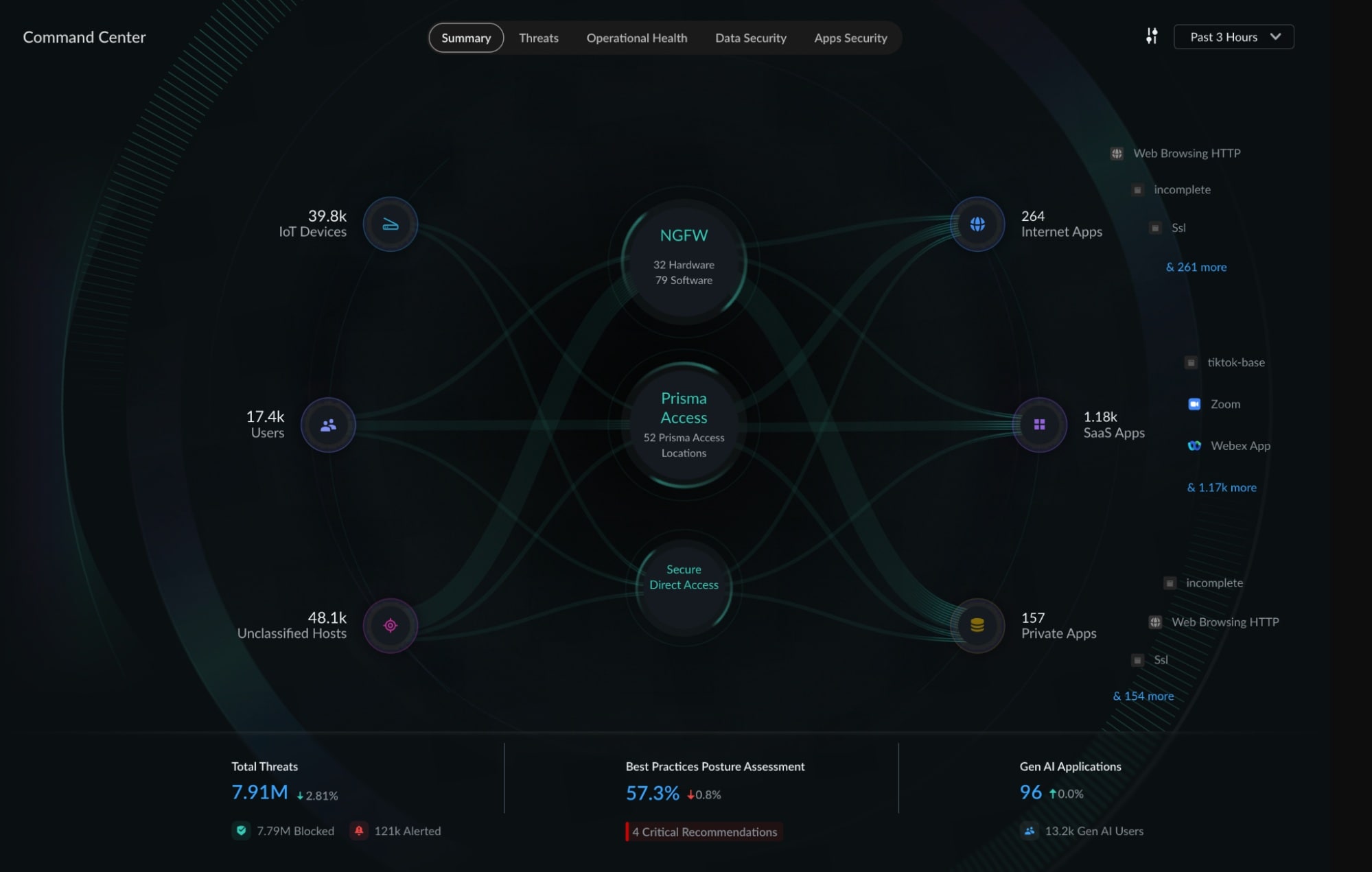
Command Center provides a consolidated view across users, IoT devices, users, hosts, applications, and security infrastructure spanning Prisma Access, NGFWs, and Prisma SD-WAN. It brings together security, operational, and experience signals so teams can understand how their environment is connected and protected without jumping between disconnected views.
With Command Center 2.0, that visibility extends even further:
- Broader visibility across the environment: See IoT devices, Prisma SD-WAN branch sites, Prisma Browser users, and other sources alongside applications and security infrastructure.
- Progressive discoverability into the connection types: The traffic sources can be further explored to identify the connection types that devices and users are using to access applications, such as Access Agent, Explicit Proxy, Agentless Proxy, Prisma Browser and many others.
- End-to-end traffic context: Understand how users, devices, and branch sites are reaching internet, SaaS, and private applications—including Secure Direct Access and other direct-access paths.
- Rich operational context: Explore user location, application access, network health, user experience, and host information to better understand where problems are occurring.
- A path from insight to action: Move directly from surfaced issues and anomalies into more detailed dashboards and investigative workflows.
Rather than simply presenting another collection of metrics, Command Center helps operators understand the relationships between users, applications, infrastructure, and security controls—and determine where to investigate next.
Turn Visibility into Security Action
The value of visibility comes from what teams can do with it.
Consider traffic reaching a SaaS application without passing through an expected security inspection point. Instead of requiring an administrator to manually piece together traffic patterns and security controls, Command Center can help surface the application access path and provide the context needed to investigate where additional enforcement may be required.
Or consider a user experiencing degraded application performance. Security and IT teams can use Command Center to understand the user’s location, application access path, deployment health, and experience signals before drilling into the underlying issue.
The result is a shorter path from seeing a problem to understanding it to taking action.
Continuously Strengthen Security Posture
Command Center also gives teams an at-a-glance view of how closely their environment aligns with security best practices.
The Best Practices Posture Assessment provides an overall view of security posture across Prisma Access, NGFWs, and Prisma SD-WAN, while surfacing prioritized opportunities for improvement. Teams can use these insights to identify gaps, prioritize security plans, and continuously strengthen their environment.
This allows teams to move beyond simply reporting posture toward understanding where to focus next to improve security outcomes by addressing gaps in security policy.
Understand GenAI Adoption and Risk
As generative AI applications become part of everyday work, security teams also need visibility into how these applications are being adopted.
Command Center provides visibility into GenAI applications used across the organization, helping teams understand application usage and adoption trends. With greater insight into how GenAI is entering the environment, security teams can make more informed decisions about governance and security based on actual usage.
One Starting Point for Network Security Operations
Whether investigating a threat, assessing user experience, reviewing security posture, or understanding how traffic is moving across the environment, teams need a common place to begin.
Command Center 2.0 makes Strata Cloud Manager that starting point—bringing together visibility across the network security platform and helping teams move from fragmented information to shared context, and from shared context to action.
Ultimately, better visibility isn’t about seeing more data. It’s about understanding what matters and knowing where to act next.
Get Started with Command Center
Command Center is available through Strata Cloud Manager, with specific capabilities and metrics based on the customer’s products, licenses, and subscriptions.
Explore Command Center in the Strata Cloud Manager documentation to learn more.