If you're reading this, you've probably spent a good part of your career taking admin rights away from people who were very sure they needed them. Most of us paid for least privilege on endpoints with tickets, escalations, and a few uncomfortable meetings, watched the exception list grow from five entries into something that needed its own owner, and still got there in the end. Then coding agents showed up.
Now every developer now has a tireless colleague running in their session, launching shells, installing packages, and editing files dozens of times a minute. The question I keep hearing from peers, and kept asking myself, is whether this calls for a brand new control category.
After a few months of poking at it, reading what our engineers wrote and arguing with colleagues, I came to the conclusion that the discipline we already have covers most of it, as long as we apply it to a new kind of user who doesn't sleep and types very fast.
Key Takeaways:
- Local AI agents run as the logged-on user, with the same token, files, credentials and sessions. In 96% of organizations, that access goes far beyond what roles require.
- Hooks answer whether a specific agent action should happen. Least privilege answers how much any action can hurt. A mature program uses both.
- Privilege and reach set the blast radius. Removing standing admin is the fastest win for humans and agents alike.
- Follow the process tree, because the damage usually happens in the agent's child processes.
Below is how I got there. There will be some product details, because I work where I work, but I'll try to keep them where they are useful, and the FAQs at the end have the reference material for anyone (or anything) that wants it.
What an Agent Looks Like to the Operating System
Strip away the chat window and an agent is a fairly ordinary program.
Claude Code drops a signed binary into %USERPROFILE%\.local\bin and keeps its settings in %USERPROFILE%\.claude. Codex CLI and a good number of its cousins arrive through npm and run as plain node.exe. Cursor installs into %LOCALAPPDATA%\Programs\cursor. None of them need admin to install, and on macOS and Linux they settle into the home directory in the same way. Auditing Program Files and the list of installed applications will often miss them, because while some per-user installers do register themselves under HKCU, the npm-delivered and portable ones leave nothing there to find.
Once running, the agent gets no identity of its own. It runs as the logged-on user, with the user's token, files, saved credentials, network shares, and SSO sessions, so the OS has no separate principal to reason about. This also makes it hard to tell from the logs whether a given action came from the person or from the agent working on their behalf, and I suspect "that wasn't me, officer, that was the agent" will become a familiar line in incident reviews. As far as the operating system is concerned, it was them.
The agent also rarely works alone. A single instruction like "fix the failing test" can produce a process tree of node, npm, git, a shell or two, and a couple of local Model Context Protocol (MCP) servers, every one of them a child process with the same token, reading and writing across the file system and calling out to the network within a few seconds.
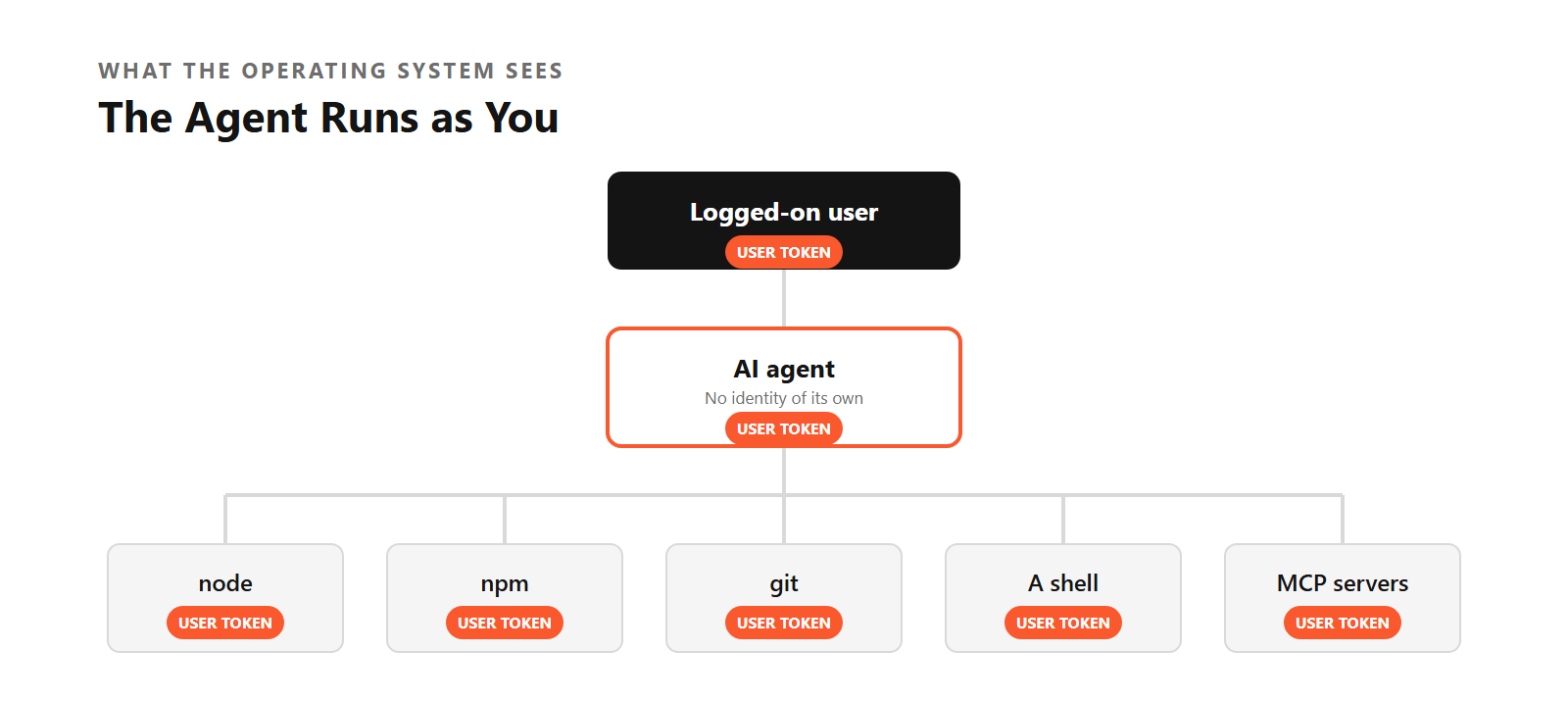
So the threat model is uncomfortably familiar. Whether it's a vibe-coding agent having a creative afternoon or an attacker moving laterally from a phished session, both inherit the privileges of the logged-in user. Research shows us that human identities operate with access far beyond what their roles require, and the agent picks up all of that excess on day one.
The attentive reader will object that the agent asks before every command. Many do, by default, right up until day three, when someone clicks "always allow" for the shell tool because the prompts are getting in the way, and we all know how that story ends.
Two Different Questions: Hook-Based Security vs. Least Privilege
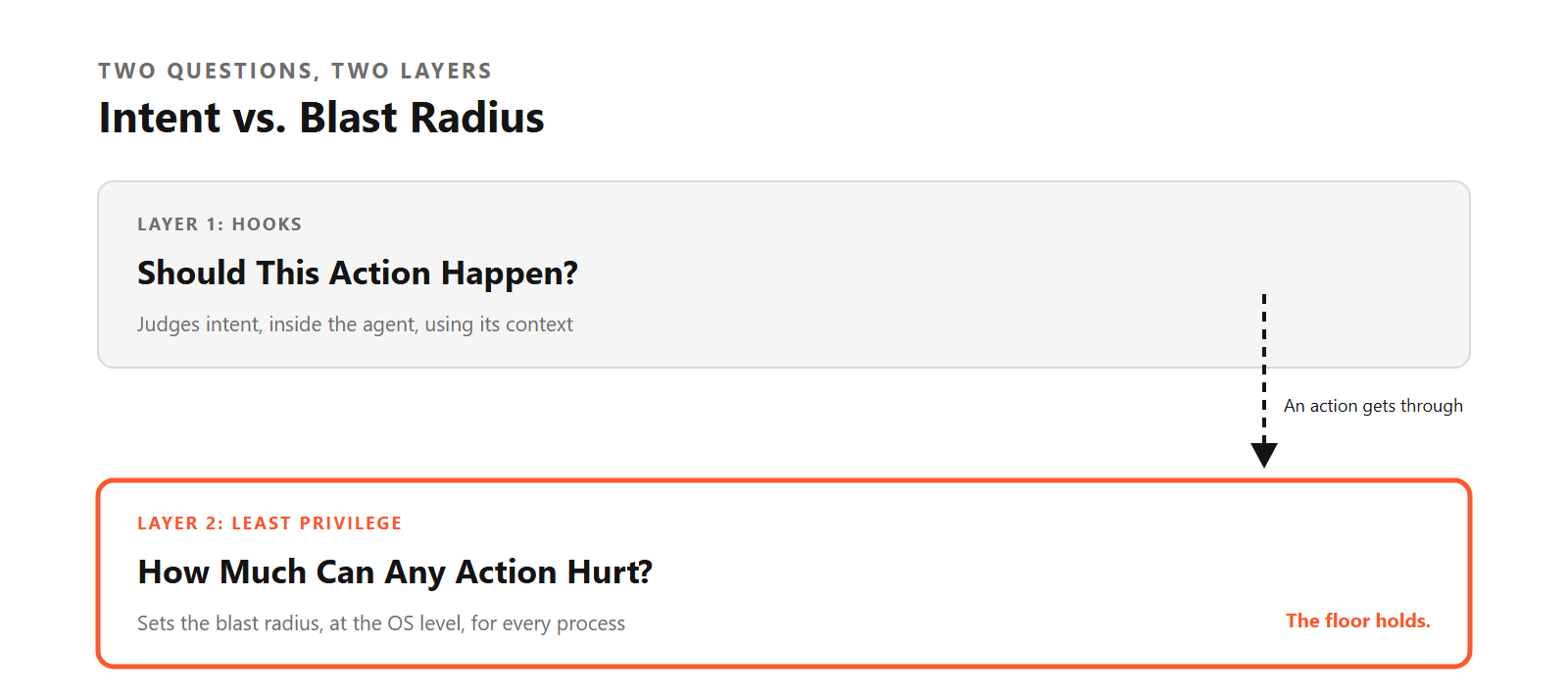
A growing class of agent-specific security tools works from inside the agent. Modern agent frameworks expose lifecycle hooks: before a tool runs, the agent hands the planned call to an external program that can allow it, deny it, or adjust it, and security tools plug into those hooks to apply policy to whatever the agent is about to do. That position gives them something nothing else on the box has, which is context. They know which MCP tool was called, with which arguments, in which session, and often the prompt that led there, so they can reason about intent, stop a risky action in the agent's own terms, and keep a trail that makes sense to a human reviewer.
The question a hook answers is whether this particular action, from this particular agent, should happen. It's a good question, and I want it answered. Working through it, though, I kept coming back to a second question that sits one layer lower and that hooks, by design, to another layer: when an action does happen, whether it was approved, misjudged, or never went through an agent at all, how much can it hurt?
A few properties of the endpoint make that second question hard to skip:
- The work happens in the processes the agent starts.
npm installruns whatever postinstall script comes with the package, and an agent that writesfix.pyand then runspython fix.pyreports a perfectly ordinary command line. What those processes do next is decided by their token and the operating system. - Agents are persistent problem solvers. Traditional software stops and shows an error when it hits a wall, and anyone who has watched a coding agent work for an afternoon has seen it treat the same wall as one more problem to solve, trying
cmd /c delafterRemove-Itemand writing a small program after that. A limit on capability holds regardless of which route the agent picks. - Plenty of things on the endpoint act as the user without being an agent. A homegrown script built on an open-source framework, a portable tool someone downloaded, malware, or an attacker sitting in a phished session all inherit the same token and have no reason to announce their plans to anyone.
- An approved action runs with the process token. When an action is allowed, it executes with whatever rights the process holds, so on a machine where the user is a local admin, the approved action is an admin action.
That last point is where it clicked for me, so let me stay on it for a moment.
The Blast Radius Has Two Dials
Think about what actually goes wrong with agents: a prompt injection buried in a README, a poisoned MCP server, a model that misreads "clean up the build folder," or an attacker who simply took over the session. The case I find most interesting is the least dramatic one, where a curious or plainly annoyed employee asks the agent to "simplify" some process that keeps getting in their way.
Picture a developer whose builds crawl because the endpoint protection scans every file, who asks the agent to make the build faster, and an agent that helpfully runs Add-MpPreference -ExclusionPath on the whole repo folder. On a machine where that developer is a local admin, the exclusion goes in quietly, and the build does get faster, along with anything else that lands in that folder from then on.
On a machine where they are a standard user, the agent gets access denied and comes back to report that it couldn't do it. Nobody in either version of the story is malicious, and every step looks like ordinary IT work, which is exactly what makes the first version so easy to miss.
When I first sketched this argument, I framed it purely around admin rights, and a colleague quickly pointed out the hole in it: most of the expensive agent stories we hear about needed no admin at all. A deleted repository, an .ssh folder and ~/.aws credentials posted somewhere they shouldn't be, or a logged-in SaaS session put to creative use all happen comfortably within a standard user's rights.
So I now think of blast radius as two dials.
The first is privilege, meaning what the process is able to change on the machine, and the second is reach, meaning what it can touch as the user: files, keys, shares, and network destinations. Some failures will be caught at the agent level, and some will look perfectly reasonable at the moment they happen. The size of the crater is decided every time by where those two dials were set.
The size of the crater is decided every time by where those two dials were set.
An agent with admin rights can modify system files, install software, change security settings, create local users and launch elevated utilities, whereas an agent running as a standard user is held to the same boundaries as the account. A hook decides what an agent should do, while privilege and reach decide what any process can do, and the second holds even on the occasions when the first is never consulted.
The good news is that most agents don't need admin at all. Reading files, writing code, running user-level commands, and talking to repositories and cloud APIs all work fine as a standard user, so the privilege dial can go down without breaking the thing people actually want. The reach dial takes more thought, since the agent legitimately needs some of what the user can touch, though I've yet to meet a coding assistant with a good reason to read the browser's password store.
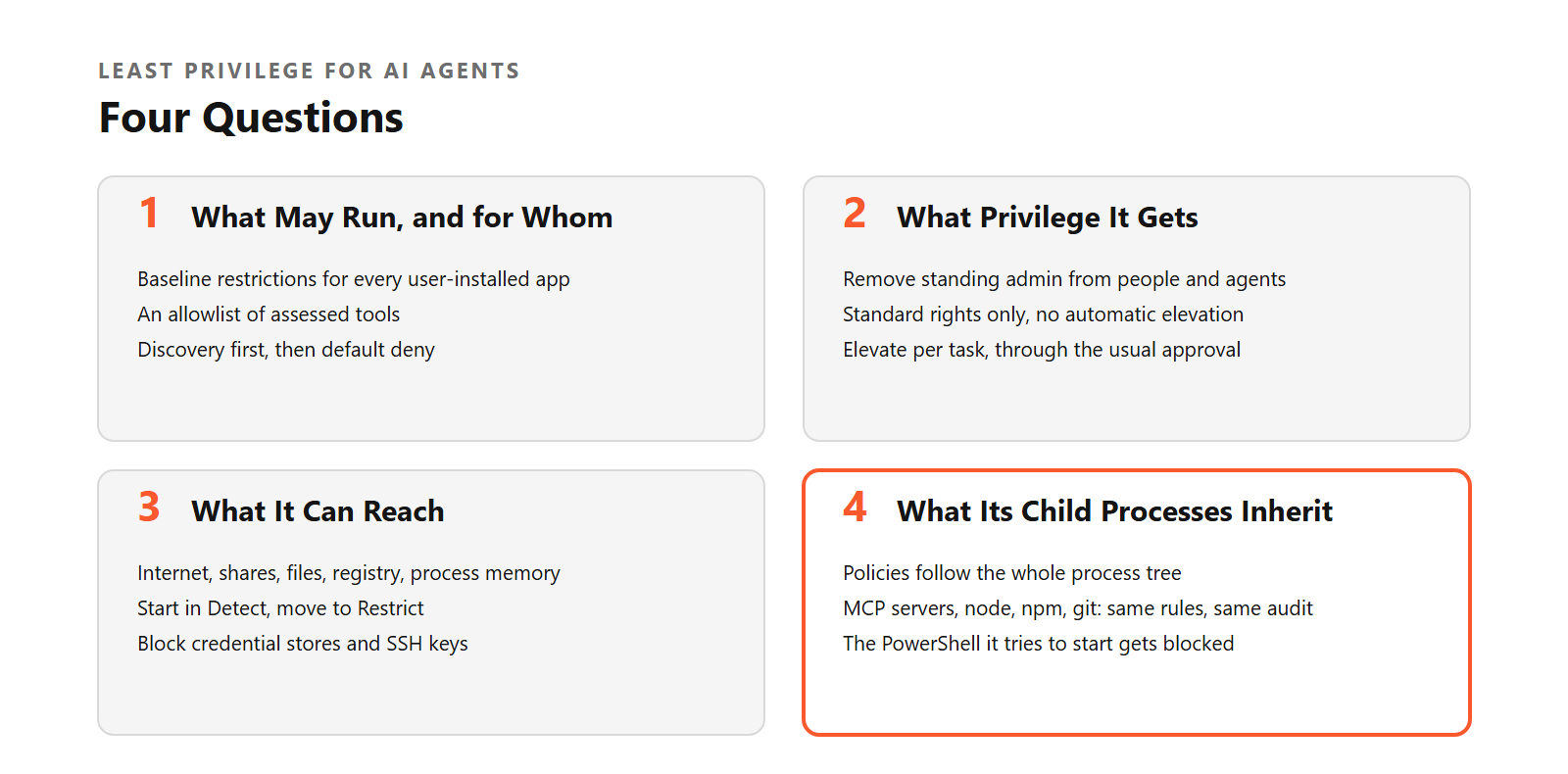
In practice, turning both dials down for agents comes down to four questions, where the first two are about privilege, and the last two are about reach. I'll describe how we answer them in Idira Endpoint Privilege Manager (EPM), because that's what I know best, but the questions stand on their own.
What May Run, and for Whom
Most agents install in the user profile, so the policy has to target that location explicitly. Our approach uses three layers. The top layer applies baseline restrictions to every user-installed application nobody has assessed yet: no spawning PowerShell, cmd, or wscript, no touching credential stores and security tooling, no writing into the memory of other processes.
The middle layer is the allowlist of tools you have assessed, identified by location plus publisher signature, original filename or hash, and each approved tool gets its own policy. Most coding agents are of little use without a shell, so the usual choice for an approved agent is to let it have one, without elevation and with its reach restricted, and to save the outright shell block for tools that do not need it.
The bottom layer starts in discovery mode, logging what user-installed apps reach for, and later flips to default deny. From then on, any new tool or agent that appears in a user profile stays blocked until someone reviews it, while updates to tools you already approved keep running, as long as the allowlist matches them on publisher and other stable criteria instead of a single file hash.
One warning from experience: Developers build and run their own executables inside their profile all day long, so plan the exceptions for build output before you flip that switch, unless you enjoy a very lively Monday morning.
What Privilege It Gets
Remove standing admin from people, and the agent loses it too. On top of that, an AI tool can be allowed to run with standard rights only, and prevented from launching elevated, receiving automatic elevation, or passing elevation to its children. If a specific task genuinely needs elevation, you grant it for that task through the same approval flow you already use for humans.
What It Can Reach
Permission to run says nothing about what the tool can touch. Application Access Control sets per-application boundaries across five categories: internet and intranet destinations, network shares, local files, registry keys, and the memory of other processes. Each category starts in Detect, so you learn what the tool really does, and moves to Restrict once you know. Memory writes can go straight to Restrict, since no legitimate coding assistant needs to write into another process. The usual suspects for file restrictions are .ssh, Credential Manager, the DPAPI master keys, and browser password stores.
For MCP servers that need a working directory, configure Application Access Control on the agent policy to allow the project folder and restrict sensitive paths. With child process inclusion enabled, those restrictions apply to the agent and its children while leaving the user free to access those locations through other applications.
What Its Child Processes Inherit
This is the part people tend to forget, and the interesting work happens exactly there, in child processes, so the policy has to follow the tree. With child process inclusion on, the node, npm, git, and MCP server processes spawned by the agent fall under the same access controls, and the same audit, and the PowerShell instance it tries to start gets blocked if you've decided this particular agent has no business with it.
All of this is enforced at the operating system layer, outside the agent. It works without any changes to the agent, and it treats an action the same way whether it came from the model, the user, or someone who stole the session. It's the same set of policies we already use for people.
What Least Privilege Doesn't Solve for AI Agents
I'd rather say this myself than have you find out in a POC.
The agent is still not a separate security principal. If the user can open the HR share, so can the agent, unless you specifically restrict that application's access to shares. Privilege controls don't read prompts, don't judge the model's reasoning, and don't inspect the content of data leaving through an allowed channel. The audit shows which tool ran, what it touched or tried to touch, and which rules fired, though it won't tell you why the model decided to do it. Process-level controls also depend on reliably identifying the AI process.
A signed native binary is easy, while an agent delivered through npm runs as node.exe signed by the Node.js publisher, and telling it apart from every other Node app on a developer's machine takes more care with location, original filename, and hashes. That's honestly one of the rougher edges. And the ready-to-import containment framework is Windows-first today.
That's why I see hooks and privilege as two layers of the same program, each doing a job the other wasn't built for. Hooks give you intent: what the agent was trying to do and why. Privilege gives you a floor that holds whenever a judgment somewhere above it turns out wrong, and it covers every process on the endpoint, agent or otherwise. A mature program wants both answers.
Privilege gives you a floor that holds whenever a judgment somewhere above it turns out wrong.
One more thing from our own slides stuck with me: Identity is the most effective control we have, but is it fast enough, now that what used to take days takes minutes?
A useful property of privilege controls is that they can be automated without making the user's life miserable. When the SOC sees something off, a playbook can drop that endpoint into a stricter mode (revoke admin, block all elevation, block unsigned and freshly downloaded executables) while the user keeps working. Isolating a host is disruptive enough that many teams keep a human in the loop for it, whereas pulling an agent's admin rights is something a playbook can do at 3 a.m. without waking anyone up.
My Deductions, in Short
- An agent is a new kind of user carrying the old kind of token, and limiting both what that token can change and what it can reach gets you most of the way.
- Hooks answer whether a specific agent action should happen, privilege answers how much any action can hurt, and a mature program answers both.
- Privilege and reach together set the blast radius, and removing standing admin is the dial that pays off fastest for humans and agents alike.
- Default deny for new user-profile executables is the most practical answer to the pace at which agents ship, provided you plan the exceptions for developer build output first.
- Follow the process tree, since the damage usually happens in the agent's child processes.
- Start in Detect and move to Restrict once you know what normal looks like, because two weeks of logs will teach you more about your agents than any vendor briefing, including this one.
An agent is a new kind of user carrying the old kind of token.
Well, That's All
If you made it this far, thank you. The next time an incident review reaches the moment where someone says "that wasn't me, officer," I hope the log shows an agent that was running as a standard user and had nowhere interesting to go. If you want to see what happens when it does have somewhere to go, Unit 42's Shay Nahari and Bryan Murphy walk through real agentic attacks.
FAQs
What is a local AI agent on an endpoint?
A local AI agent is an application installed on a user's workstation that plans and executes multi-step tasks autonomously by invoking tools such as shells, scripting interpreters, package managers, compilers and MCP (Model Context Protocol) servers. Common examples are Claude Code (Anthropic), Cursor (Anysphere), GitHub Copilot in the IDE and CLI (GitHub/Microsoft), OpenAI Codex CLI, Google Antigravity and Amazon Q Developer (AWS). Most install in the user profile without administrative rights, for example %USERPROFILE%\.claude, %USERPROFILE%\.codex or %LOCALAPPDATA%\Programs\cursor on Windows, and ~/.claude or ~/.cursor on macOS and Linux. Application control that targets only system directories does not detect or restrict these tools.
What identity and privileges does a local AI agent use?
A local AI agent runs as the logged-on user. The operating system does not create a separate identity, security token, or trust boundary for it. The agent inherits the user's permissions, files, saved credentials, network share access, and authenticated sessions. If the user is a local administrator, the agent has administrator rights. Every child process the agent launches (shells, interpreters, package managers, MCP servers) inherits the same token. Because the agent operates in the user's session, it is difficult to distinguish agent-driven activity from user-driven activity in logs.
Why is least privilege the primary control for limiting the blast radius of AI agents?
The damage an AI agent can cause is bounded by the privileges of the process it runs in. An agent with administrator rights can modify operating system files, install software, change security settings, create local users, access protected resources, and launch elevated utilities. An agent running with standard user rights is limited to what the standard account can do. Least privilege therefore reduces the impact of every failure mode at once: Model error, misconfiguration, well-intentioned user requests (such as asking an agent to "simplify" a process) that remove security controls as a side effect, prompt injection, a malicious or compromised MCP server, a compromised AI application, and an attacker operating inside the user's session. The control applies regardless of which agent is involved and regardless of how a given action is phrased or obfuscated. Most AI agents do not need administrative rights for their normal work, which includes reading files, generating code, running user-level commands, accessing repositories, and calling cloud services.
What is hook-based AI agent security?
Hook-based AI agent security integrates with lifecycle hooks that some AI agent frameworks expose, such as hooks that run before a tool call executes. The agent passes the planned action (for example, a shell command, a file write or an MCP tool call with its arguments) to an external program, which can allow, deny, or modify it according to policy. The main strength of this approach is semantic context: it can see which tool the agent intends to use, with which parameters, and often the prompt or session that led to the action. This makes it well suited to judging whether a specific agent action is appropriate and to producing an agent-level activity trail.
Which task does hook-based security address, and which does least privilege address?
Hook-based security and least privilege answer different questions and are complementary. Hook-based security answers whether a specific action requested by a supported AI agent should be allowed, using the agent's own context. Least privilege answers how much damage any process on the endpoint can do once an action executes, regardless of whether the action was approved, misjudged, or never passed through an agent. Least privilege matters at this second layer for four reasons:
- The effects of an agent action often happen in the processes it starts, such as package install scripts or a script file the agent wrote and then executed. Those processes are governed by their token and the operating system.
- AI agents are goal-seeking and can attempt alternative paths after a denial, for example, a different command, interpreter, or newly written program. A limit on capability applies to every path.
- Many processes act as the user without being AI agents, including custom scripts, portable tools, malware, and attackers operating in the user's session.
- An allowed action runs with the full privileges of the process. Reducing those privileges reduces the impact of every allowed action.
The recommended approach is to use both layers, with least privilege as the baseline.
How does Idira EPM govern AI agents on endpoints?
Idira Endpoint Privilege Manager from Palo Alto Networks governs AI agents with the same policy model it uses for people and applications, through four controls:
- Application Control: Which AI tools may run, and for which users, groups, or roles. Unapproved tools can be blocked.
- Privilege Control: Removal of standing local administrator rights; AI tools can be allowed to run with standard rights only and prevented from launching as administrator, receiving automatic elevation, or inheriting administrator rights. Elevation can be granted per task where justified.
- Application Access Control: Per-application restrictions on internet and intranet destinations, network shares, local files, registry keys (Windows), and write access to the memory of other processes.
- Child Process Control: Policies, access restrictions, and audit extended to every process the AI agent spawns, including MCP servers, with the ability to block high-risk child processes such as PowerShell or cmd.
These controls are enforced at the operating system layer, independently of the AI application, and require no changes to the AI tool or its configuration.
What is the Idira EPM three-layer framework for user-installed AI agents?
The three-layer framework is a set of EPM policies for applications that install and run from the user profile, including most AI agents. Layers apply in priority order:
- Layer 1: risk-reduction controls applies to all user-based applications, approved or not. Restricts spawning of high-risk interpreters (PowerShell,
cmd.exe,wscript.exe), access to Windows credential stores and security components, write access to other processes' memory, and access to sensitive OS security tooling. This limits impact even before a tool has been assessed, including tools manipulated through prompt injection. - Layer 2: allowlist of approved AI agents; assessed tools are exempt from Layer 1 and run with the access defined in their own policy.
- Layer 3: discovery then default deny. The policy "UBA Layer 3 - Discovery of User-Based Apps" allows user-based apps to run with Application Access Control in Detect mode to log their access during assessment. The policy "UBA Layer 3 - Default Deny for User-Based App" then blocks any user-based application not on the Layer 2 allowlist, including AI tools released after the policy was configured.
A ready-to-import set of these policies for Windows is available in the Idira (ex-CyberArk) EPM Community Knowledge Base article "EPM: How to Contain User-Based Applications." It's compatible with the EPM QuickStart methodology.
How should approved AI agents be identified in Idira EPM policy?
Use location set to %USERPROFILE% including subfolders in every definition. For digitally signed tools such as Claude Code, Cursor, and GitHub Copilot, add the publisher signature; location plus publisher is sufficient for signed applications. Add the original filename to approve one specific product from a vendor, since it is compiled into the binary and cannot be changed without invalidating the signature. Use a checksum hash for unsigned tools and scripts, because filenames and metadata in user profile directories can be modified by the user.
What can Idira EPM Application Access Control restrict for an AI agent?
Application Access Control is an option in Allow and Elevate application policies on Windows and macOS. It covers five resource categories, each set to Off, Detect (access allowed and logged), or Restrict (access blocked, optionally audited and with user notification):
| Resource Category | Agentic AI Risk | Recommended Approach |
|---|---|---|
| Internet and intranet | A manipulated agent can send data to unauthorized destinations | Detect, then restrict to an approved domain list |
| Network shares | Agents traverse shares looking for context | Detect, then restrict for tools without a documented need |
| Local files | Agents have no legitimate need for SSH keys, credential stores, browser profiles, or certificates | Detect, then restrict with explicitly allowed paths |
| Registry keys (Windows) | Persistence and credential theft, including LSA secrets and cached credentials | Detect, then restrict for tools without a documented need |
| Memory of other processes (write) | Credential dumping and process injection | Restrict immediately |
Which file paths should AI agents be blocked from accessing?
At minimum: %USERPROFILE%\.ssh\ (SSH private keys), %APPDATA%\Microsoft\Credentials\ (Windows Credential Manager), %APPDATA%\Microsoft\Protect\ (DPAPI master keys), %LOCALAPPDATA%\Google\Chrome\User Data\Default\Login Data (Chrome saved passwords and session tokens) and %APPDATA%\Mozilla\Firefox\Profiles\ (Firefox saved passwords and session data). Add paths specific to the organization's applications and data classification.
How can MCP server access be scoped with Idira EPM?
MCP servers usually run as local child processes of the AI agent. With "Include child processes" enabled in the agent's application policy, MCP server processes fall under the same access controls and audit as the agent. For path-level control, configure Application Access Control in the agent policy to allow the MCP working directory and restrict sensitive paths such as SSH keys and credential stores. Because Application Access Control applies to the application and its child processes, the agent and its MCP servers are restricted while the user keeps normal access to the same locations through other applications. EPM File System and Registry Access user policies apply to the user in every application, including native access, so they suit cases where the user should also lose access to a path. Each MCP integration should be treated as a distinct trust decision.
Do AI agents need local administrator rights?
Most do not. Typical agent tasks (reading files, generating content, running user-level commands, accessing development repositories and calling cloud services) work with standard user rights. Idira EPM can prevent AI applications from launching as administrator, receiving automatic elevation or inheriting administrator rights, and can control whether their child processes receive elevated rights. Without these controls, any AI tool launched by a local administrator inherits significant control over the endpoint.
What audit data does Idira EPM provide about AI agents?
With policy audit data collection and "Audit policy enforcement" enabled, the EPM Policy Audit page records which users ran which AI tools on which endpoints and when, which destinations, files, shares or registry paths a tool attempted to reach in Detect mode, which access attempts were blocked, and which rules trigger most often. Child process tracking adds MCP server invocations, shell and interpreter launches and resource access by any process in the agent's tree. Audit video is also available. EPM records that an action, elevation or access attempt occurred and which policy applied. It does not record the actions performed inside an elevated process or the model's reasoning.
What does Idira EPM not do for AI agents?
Idira EPM does not create a separate operating system identity or trust boundary for an AI agent; if the user can access a resource, the agent can too unless application-level restrictions apply. EPM does not analyze prompts, monitor AI decision-making, prevent prompt injection inside AI applications, inspect the content of data flows, perform network traffic inspection, or govern non-human identities in cloud and SaaS environments. Process-level controls require that the AI process can be reliably identified. The ready-to-import containment policies are provided for Windows. EPM is a privilege containment and application control layer intended to be combined with endpoint detection and response, data protection, and AI governance controls.
How does Idira EPM relate to EDR and agent-level security tools?
EDR detects and responds to malicious activity. Agent-level security tools govern what supported AI agents do inside their tools, using the agent's context. Idira EPM controls which applications may run and what privilege and resource access any process, including AI agents and their child processes, receives from the operating system. The three operate at different layers and are designed to be used together.
Can AI agent privileges be restricted automatically during an incident?
Yes. In an integration with Cortex XSIAM, a detection triggers a playbook (automatically or with human approval) that switches the affected endpoint to a stricter Idira EPM policy set while the user stays operational. For high-risk events: Revoke administrative privileges, block all elevation, block unsigned applications, block applications downloaded from the internet, and block applications launched from user profiles, including portable apps. For lower-risk events, require MFA for any elevation, prevent elevation of PowerShell, CMD, and scripts, prevent elevation of unsigned apps, scripts, and DLLs, and prevent elevation of apps launched from user profiles.
How should an organization roll out AI agent controls with Idira EPM?
In nine phases, visibility first:
- Discover AI tools with Application Catalog scans and Application Coverage by Policies.
- Observe unhandled AI tool activity in Events Management with default policies in Detect mode.
- Classify each tool as Block, Allow (standard rights), or Elevate.
- Contain with the three-layer user-based application framework.
- Enable Application Access Control in Detect mode for approved tools.
- Harden by moving memory and registry to Restrict and narrowing file and internet access.
- Scope MCP access with Application Access Control path restrictions on the agent policy, including child processes.
- Audit with Policy Audit, Audit Policy Enforcement, and Include Child Processes.
- Enforce with the Layer 3 default-deny policy and a regular review cycle.
How widespread is unmanaged AI agent use?
According to the Cloud Security Alliance ("Autonomous but Not Controlled: AI Agent Incidents Now Common in Enterprises," April 2026), 82% of organizations have discovered AI agents running that IT did not know about, and 65% experienced an AI agent security incident in the past year. The IBM Institute for Business Value (2026 Tech Leader Study, June 2026) found that 77% of organizations say AI adoption is outpacing their governance capabilities. The Palo Alto Networks 2026 Identity Security Landscape Report found that human identities in 96% of organizations have access far beyond what their roles require, and AI agents inherit that access.